[转]SQL Server 2005 Error Log Management
Problem
My SQL Server 2005 error log is getting very large due to auditing login activity and freezes Management Studio when it loads. On another SQL Server I have lost much of the historical error log data from SQL Server service restarts and Windows reboots. Do I have any options to address these two needs to review and retain this data in an easy manner?
Solution
Yes - A few options are available to address the size and number of error logs for both SQL Server and SQL Server Agent. Let's break these down as well as outline another alternative to review these files without locking Management Studio.
SQL Server Error Log
To limit the size of the SQL Server error log, the sp_cycle_errorlog system stored procedure can be issued to start a new error log. Depending on the growth rate of the SQL Server error log dictates when sp_cycle_errorlog should be issued. Reference the code below as an example.
| EXEC master.sys.sp_cycle_errorlog;
-- Expected successful output |
Next, the easiest means to address this need would be to schedule a SQL Server Job to support the need. Reference the SQLServer2005_CycletheErrorLog_Job.txt as a point of reference.
Finally, to address not loosing the historical SQL Server error log, the number of logs should be expanded beyond the default of 7. The maximum number of logs is 99 for the SQL Server error log. When it comes to expanding the number of SQL Server error logs, follow these steps:
- Open Management Studio
- Navigate to root | Management folder | SQL Server Logs folder
- Right click on the SQL Server Logs folder and select the 'Configure' option
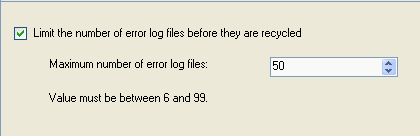
- Select the 'Limit the number of error log files before they are recycled' check box
- Reference the screen shot below as a point of reference
- Enter the desired number of error logs in the 'Maximum number of error log files'
- Reference the screen shot below as a point of reference
- Press the 'OK' button to save the configuration
Alternatively, the following code can be used to automate the process across multiple SQL Servers:
| USE [master] GO EXEC xp_instance_regwrite N'HKEY_LOCAL_MACHINE', N'Software\Microsoft\MSSQLServer\MSSQLServer', N'NumErrorLogs', REG_DWORD, 50 GO |
SQL Server Agent Error Log
The SQL Server Agent error log follows much of the same paradigm as the SQL Server error log. The recycling process is completed by the sp_cycle_agent_errorlog in the MSDB database.
| EXEC msdb.dbo.sp_cycle_agent_errorlog; -- Expected successful output -- Command(s) completed successfully. |
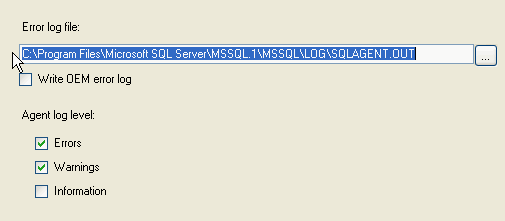
In terms of configuring a specified number of SQL Server Agent error logs, this is not possible. Only the current and 9 additional (a total of 10) SQL Server Agent error logs will be retained. What can be configured are the type of messages (Errors, Warnings, Informational ) that are written to the SQL Server Agent error logs. To access this interface, follow these steps:
-
Open Management Studio
-
Navigate to root | SQL Server Agent | Error Logs folder
-
Right click on the Error Logs folder and select the 'Configure' option, reference the screen shot below
To automate this process across servers, reference the sp_set_sqlagent_properties system stored procedure. Below outlines a sample execution.
| USE [msdb] GO EXEC msdb.dbo.sp_set_sqlagent_properties @errorlogging_level=7 GO |
Alternative Error Log Access
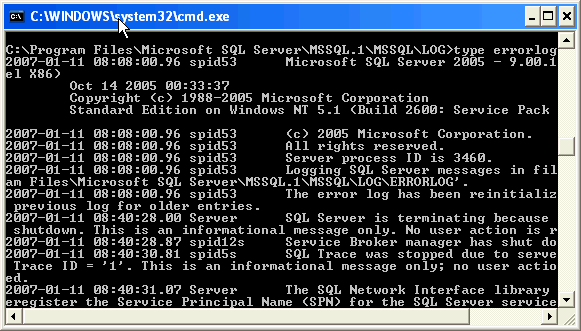
The primary interface to access the SQL Server Error Logs is via the Log File Viewer. This application provides insight into the SQL Server and Windows logs. This application provides a means to review multiple logs as well as search and filter the logs. If you do have a large error log that causes issues for this application, this should be copied and pasted and then the copied log can be reviewed via DOS's type command. Although this is a less than ideal interface, it appears to provide immediate access and will not affect SQL Server writing new records to the original log. Below is an example of reading a SQL Server Error log via DOS's type command.
Next Steps
- Expanding the number of SQL Server error logs is beneficial to retain historical system information which can easily be overwritten.
- At the same time, if the SQL Server error logs are difficult to manage, then recycling the error logs will help maintain a reasonable amount of data in each log.
- Keep in mind that you need to determine what the correct interval is for your SQL Server and balance the recycling process with the volume of log data.
- If you need to capture more than 99 logs, consider building a separate process to capture the logs on a regular basis so historical information is not lost.
- Check out these related tips on MSSQLTips.com:
- Discuss this tip: http://blogs.mssqltips.com/forums/t/330.aspx
- There are 0 comments for this tip
来自 “ ITPUB博客 ” ,链接:https://blog.itpub.net/10640532/viewspace-573246/ ,如需转载,请注明出处,否则将追究法律责任。

最新文章
- ORA-12505: Using Oracle RAC and Java JDBC thin client Connection
- Oracle Database Server 'TNS Listener'远程数据投毒漏洞
- EXP-00106: 数据库链接口令无效
- exp遇到错误ORA-06512 SYS.DBMS_EXPORT_EXTENSION
- DROP USER ORA-00600[16206]
- ORACLE口令文件
- oracle decode用法
- Oracle to_char()
- 切换TEMP表空间遭遇enq: TS - contention
- ORA-01555 on Active Data Guard Standby Database
