Oracle_UNDO坏块测试和修复(BBED)
Oracle_UNDO 坏块测试和修复
![]() UNDO段头块损坏测试与修复
UNDO段头块损坏测试与修复
本次案例通过 BBED 工具模拟UNDO 段头坏块,并在没有备份情况下启动数据库;
1 查看UNDO 段头块位置
select header_file, header_block
from dba_segments
where segment_name like '_SYSSMU%'
order by 2;

2 通过BBED 工具,破坏UNDO 某一段的段头块(file=3 block=280)
破坏的方式是直接将其他的数据块覆盖段头块
[oracle11@primary ~]$ bbed parfile=bbed.par
Password:
BBED: Release 2.0.0.0.0 - Limited Production on Sat Jul 30 18:00:26 2016
Copyright (c) 1982, 2011, Oracle and/or its affiliates. All rights reserved.
************* !!! For Oracle Internal Use only !!! ***************
BBED> copy dba 1,1 to dba 3,280
BBED> sum apply;
Check value for File 3, Block 280:
current = 0x599e, required = 0x599e
BBED> verify
DBVERIFY - Verification starting
FILE = /u02/app/oracle/oradata/orcl11/ undotbs01.dbf
BLOCK = 280
Block 280 is corrupt
Corrupt block relative dba: 0x00400118 (file 0, block 280)
Bad header found during verification
Data in bad block:
type: 11 format: 2 rdba: 0x00400001
last change scn: 0x0000.00000000 seq: 0x1 flg: 0x04
spare1: 0x0 spare2: 0x0 spare3: 0x0
consistency value in tail: 0x00000b01
check value in block header: 0xc8c7
computed block checksum: 0x0
DBVERIFY - Verification complete
Total Blocks Examined : 1
Total Blocks Processed (Data) : 0
Total Blocks Failing (Data) : 0
Total Blocks Processed (Index): 0
Total Blocks Failing (Index): 0
Total Blocks Empty : 0
Total Blocks Marked Corrupt : 1
Total Blocks Influx : 0
Message 531 not found; product=RDBMS; facility=BBED
--- 通过 BBED 和 DBV 检查结果都是 file3,block 280 损坏
[oracle11@primary orcl11]$ dbv file=undotbs01.dbf
DBVERIFY: Release 11.2.0.4.0 - Production on Sat Jul 30 18:01:38 2016
Copyright (c) 1982, 2011, Oracle and/or its affiliates. All rights reserved.
DBVERIFY - Verification starting : FILE = /u02/app/oracle/oradata/orcl11/undotbs01.dbf
Page 280 is marked corrupt
Corrupt block relative dba: 0x00c00118 ( file 3, block 280)
Bad header found during dbv:
Data in bad block:
type: 11 format: 2 rdba: 0x00400001
last change scn: 0x0000.00000000 seq: 0x1 flg: 0x04
spare1: 0x0 spare2: 0x0 spare3: 0x0
consistency value in tail: 0x00000b01
check value in block header: 0xc8c7
computed block checksum: 0x0
DBVERIFY - Verification complete
Total Pages Examined : 392
Total Pages Processed (Data) : 0
Total Pages Failing (Data) : 0
Total Pages Processed (Index): 0
Total Pages Failing (Index): 0
Total Pages Processed (Other): 45
Total Pages Processed (Seg) : 23
Total Pages Failing (Seg) : 0
Total Pages Empty : 346
Total Pages Marked Corrupt : 1
Total Pages Influx : 0
Total Pages Encrypted : 0
Highest block SCN : 1283208 (0.1283208)
--- 模拟异常断电
SQL> shutdown abort
ORACLE instance shut down.
--- 启动数据库,报错 ORA-01578
SQL> startup
ORACLE instance started.
Total System Global Area 784998400 bytes
Fixed Size 2257352 bytes
Variable Size 515903032 bytes
Database Buffers 264241152 bytes
Redo Buffers 2596864 bytes
Database mounted.
ORA-01092: ORACLE instance terminated. Disconnection forced
ORA-01578 : ORACLE data block corrupted ( file # 3, block # 280)
ORA-01110: data file 3: '/u02/app/oracle/oradata/orcl11/undotbs01.dbf'
Process ID: 8265
Session ID: 1 Serial number: 5
通常UNDO 损坏,在没有备份的情况下,可以通过以下方式启动数据库
#*.undo_tablespace='UNDOTBS1' ---- 注释原UNDO 表空间
#*.undo_management=AUTO ----UNDO 管理方式改为手动
*.undo_management='MANUAL'
*.undo_tablespace='SYSTEM' --- 将UNDO 表空间改成SYSTEM
*._corrupted_rollback_segments= 损坏的回滚段 --- 屏蔽损坏的UNDO 段
创建新的回滚段:
create undo tablespace UNDOTBS2 datafile '/u02/app/oracle/oradata/orcl11/undotbs02.dbf' size 1M autoextend on;
删除旧的回滚段:
drop tablespace UNDOTBS1 including contents and datafiles;
*.undo_tablespace='UNDOTBS2'
*.undo_management=AUTO
但是在 mount 状态下无法查询 ( 创建或删除 ) 回滚段
SQL> select * from v$rollname;
select * from v$rollname
*
ERROR at line 1:
ORA-01219: database not open: queries allowed on fixed tables/views only
无法创建新的UNDO 表空间
SQL> create undo tablespace UNDOTBS2 datafile '/u02/app/oracle/oradata/orcl11/undotbs02.dbf' size 1M autoextend on;
create undo tablespace UNDOTBS2 datafile '/u02/app/oracle/oradata/orcl11/undotbs02.dbf' size 1M autoextend on
*
ERROR at line 1:
ORA-01109: database not open
无法删除旧的UNDO 表空间
SQL> drop tablespace UNDOTBS1 including contents and datafiles;
drop tablespace UNDOTBS1 including contents and datafiles
*
ERROR at line 1:
ORA-01109: database not open
在数据库不能 OPEN 情况下,有两种方式可以查询数据库部分信息;
1 :strings 命令可以查询所有的UNDO 回滚段名,包括已经删除的回滚段;
[oracle11@primary orcl11]$ strings system01.dbf | grep _SYSSMU | cut -d $ -f 1 | sort -u > listSMU
[oracle11@primary orcl11]$ vim listSMU
_SYSSMU20_3293637928$
_SYSSMU20_379396250$
_SYSSMU20_379396250$
_SYSSMU13_811223436$
........
2 :BBED 工具也可以查询UNDO 段名;
BBED> set file 1 block 225 -----Oracle 11g 版本, undo$ 表信息一般位于 1 号文件第 225 个数据块中
FILE# 1
BLOCK# 225
BBED> map
File: /u02/app/oracle/oradata/orcl11/system01.dbf (1)
Block: 225 Dba:0x004000e1
------------------------------------------------------------
KTB Data Block (Table/Cluster)
struct kcbh, 20 bytes @0
struct ktbbh, 48 bytes @20
struct kdbh, 14 bytes @68
struct kdbt[1], 4 bytes @82
sb2 kdbr[25] @86 ------- 含有25 个UNDO 段
ub1 freespace[6402] @136
ub1 rowdata[1650] @6538
ub4 tailchk @8188
BBED> p kdbr
sb2 kdbr[0] @86 8078
sb2 kdbr[1] @88 8011
sb2 kdbr[2] @90 7944
......
sb2 kdbr[22] @130 6603
sb2 kdbr[23] @132 6537
sb2 kdbr[24] @134 6470
BBED> x /rnc *kdbr[0] ---- 查看0 号UNDO 段名称
col 1[6] @8151: SYSTEM
BBED> x /rnc *kdbr[1] ---- 查看1 号UNDO 段名称
col 1[20] @8085: _SYSSMU1_4115952380$
如果UNDO 段特别多,可以通过EXECL ,自动生成多个x /rnc *kdbr[0]......*kdbr[n] 命令,再将命令复制粘贴到BBED 中,同时获取多个UNDO 段名;
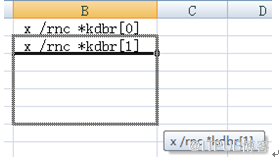
|
x /rnc *kdbr[0] |
|
x /rnc *kdbr[1] |
|
x /rnc *kdbr[2] |
|
x /rnc *kdbr[3] |
|
...... x /rnc *kdbr[24] |
如果不能判断具体哪个回滚段出现问题,可以跳过所有的回滚段
*. _corrupted_rollback_segments='_SYSSMU1_4115952380$','_SYSSMU2_3882698531$','_SYSSMU3_1780844141$','_SYSSMU4_1137450214$','_SYSSMU5_2972601029$','_SYSSMU6_2318781079$','_SYSSMU7_1865616030$','_SYSSMU8_4279519761$','_SYSSMU9_1551968587$','_SYSSMU10_2324134815$','_SYSSMU11_2069826877$','_SYSSMU12_2242918609$','_SYSSMU13_811223436$','_SYSSMU14_1093125402$','_SYSSMU15_2825991097$','_SYSSMU16_252471872$','_SYSSMU17_3347133763$','_SYSSMU18_1765883319$','_SYSSMU19_1005333767$','_SYSSMU20_3293637928$','_SYSSMU21_3641740596$','_SYSSMU22_3421614834$','_SYSSMU23_138031739$'
参数文件:
#*.undo_tablespace='UNDOTBS1'
#*.undo_management=AUTO
*.undo_tablespace='SYSTEM'
*.undo_management='MANUAL'
*._corrupted_rollback_segments='_SYSSMU1_4115952380$','_SYSSMU2_3882698531$','_SYSSMU3_1780844141$','_SYSSMU4_1137450214$','_SYSSMU5_2972601029$','_SYSSMU6_2318781079$','_SYSSMU7_1865616030$','_SYSSMU8_4279519761$','_SYSSMU9_1551968587$','_SYSSMU10_2324134815$','_SYSSMU11_2069826877$','_SYSSMU12_2242918609$','_SYSSMU13_811223436$','_SYSSMU14_1093125402$','_SYSSMU15_2825991097$','_SYSSMU16_252471872$','_SYSSMU17_3347133763$','_SYSSMU18_1765883319$','_SYSSMU19_1005333767$','_SYSSMU20_3293637928$','_SYSSMU21_3641740596$','_SYSSMU22_3421614834$','_SYSSMU23_138031739$'
SQL> shutdown immediate
SQL> startup
ORACLE instance started.
Total System Global Area 784998400 bytes
Fixed Size 2257352 bytes
Variable Size 515903032 bytes
Database Buffers 264241152 bytes
Redo Buffers 2596864 bytes
Database mounted.
Database opened.
创建新的UNDO 表空间
create undo tablespace UNDOTBS2 datafile '/u02/app/oracle/oradata/orcl11/undotbs02.dbf' size 1M autoextend on;
删除旧的UNDO 表空间
drop tablespace UNDOTBS1 including contents and datafiles;
修改参数文件
*.undo_tablespace='UNDOTBS2'
*.undo_management=AUTO
#*.undo_tablespace='SYSTEM'
#*.undo_management='MANUAL'
#*._corrupted_rollback_segments='_SYSSMU1_4115952380$','_SYSSMU2_3882698531$','_SYSSMU3_1780844141$','_SYSSMU4_1137450214$','_SYSSMU5_2972601029$','_SYSSMU6_2318781079$','_SYSSMU7_1865616030$','_SYSSMU8_4279519761$','_SYSSMU9_1551968587$','_SYSSMU10_2324134815$','_SYSSMU11_2069826877$','_SYSSMU12_2242918609$','_SYSSMU13_811223436$','_SYSSMU14_1093125402$','_SYSSMU15_2825991097$','_SYSSMU16_252471872$','_SYSSMU17_3347133763$','_SYSSMU18_1765883319$','_SYSSMU19_1005333767$','_SYSSMU20_3293637928$','_SYSSMU21_3641740596$','_SYSSMU22_3421614834$','_SYSSMU23_138031739$'
SQL> shutdown immediate
Database closed.
Database dismounted.
ORACLE instance shut down.
SQL> startup
ORACLE instance started.
Total System Global Area 784998400 bytes
Fixed Size 2257352 bytes
Variable Size 515903032 bytes
Database Buffers 264241152 bytes
Redo Buffers 2596864 bytes
Database mounted.
Database opened.
SQL> show parameter undo
NAME TYPE VALUE
------------------------------------ ----------- ------------------------------
undo_management string AUTO
undo_retention integer 900
undo_tablespace string UNDOTBS2
BBED 修改数据块是比较危险的操作,如果某个修改操作有误,可以通过 revert 或 undo 命令回退BBED 的修改操作;
例如:BBED 回退3,280 块上所有修改
BBED> revert dba 3,280
All changes made to this block will be rolled back. Proceed? (Y/N) y
Reverted file '/u02/app/oracle/oradata/orcl11/undotbs01.dbf', block 280
BBED> sum apply;
Check value for File 3, Block 280:
current = 0x3f90, required = 0x3f90
![]() UNDO非段头(文件头)块损坏测试与修复
UNDO非段头(文件头)块损坏测试与修复
undo 非段头( 文件头) 损坏,数据库可以正常启动,在没有备份的情况下,可以通过alert 报错信息,找到并删除受损的回滚段
SQL> insert into t values(1); ----- 插入一条数据,不提交
SQL> select usn,status,xacts from v$rollstat;
USN STATUS XACTS
---------- --------------- ----------
0 ONLINE 0
8 ONLINE 0
9 ONLINE 1 ----9 号回滚段存在活动事物
10 ONLINE 0
11 ONLINE 0
12 ONLINE 0
24 ONLINE 0
25 ONLINE 0
26 ONLINE 0
27 ONLINE 0
28 ONLINE 0
11 rows selected.
--- 查看回滚段头块位置
SQL> SET LINE 100
SQL> col segment_name for a30
SQL> select segment_name,header_file,header_block from dba_segments where segment_name like '_SYSSMU%' order by 3;
SEGMENT_NAME HEADER_FILE HEADER_BLOCK
------------------------------ ----------- ------------
_SYSSMU8_4161384913$ 3 8
_SYSSMU9_1458183674$ 3 24
_SYSSMU10_2644453179$ 3 40
_SYSSMU11_4737420$ 3 56
_SYSSMU12_392022772$ 3 72
_SYSSMU24_4044825012$ 3 88
_SYSSMU25_2098992521$ 3 104
_SYSSMU26_2158116475$ 3 120
_SYSSMU27_4048022843$ 3 136
_SYSSMU28_1413754230$ 3 152
10 rows selected.
通过BBED 工具,手动破坏9 号回滚段非头块;
[oracle11@primary ~]$ bbed parfile=bbed.par
Password:
BBED: Release 2.0.0.0.0 - Limited Production on Sat Aug 13 22:35:38 2016
Copyright (c) 1982, 2011, Oracle and/or its affiliates. All rights reserved.
************* !!! For Oracle Internal Use only !!! ***************
BBED> copy dba 1,1 to dba 3,25
BBED> sum apply;
Check value for File 3, Block 25:
current = 0xae9a, required = 0xae9a
BBED> verify
DBVERIFY - Verification starting
FILE = /u02/app/oracle/oradata/orcl11/undotbs01.dbf
BLOCK = 25
Block 25 is corrupt
Corrupt block relative dba: 0x00400019 (file 3, block 25)
Bad header found during verification
Data in bad block:
type: 11 format: 2 rdba: 0x00400001
last change scn: 0x0000.00000000 seq: 0x1 flg: 0x04
spare1: 0x0 spare2: 0x0 spare3: 0x0
consistency value in tail: 0x00000b01
check value in block header: 0xae9a
computed block checksum: 0x0
DBVERIFY - Verification complete
Total Blocks Examined : 1
Total Blocks Processed (Data) : 0
Total Blocks Failing (Data) : 0
Total Blocks Processed (Index): 0
Total Blocks Failing (Index): 0
Total Blocks Empty : 0
Total Blocks Marked Corrupt : 1
Total Blocks Influx : 0
Message 531 not found; product=RDBMS; facility=BBED
[oracle11@primary orcl11]$ d bv file=undotbs01.dbf
DBVERIFY: Release 11.2.0.4.0 - Production on Wed Aug 17 11:39:35 2016
Copyright (c) 1982, 2011, Oracle and/or its affiliates. All rights reserved.
DBVERIFY - Verification starting : FILE = /u02/app/oracle/oradata/orcl11/undotbs01.dbf
Page 25 is marked corrupt
Corrupt block relative dba: 0x00c00019 (file 3, block 25)
Bad header found during dbv:
Data in bad block:
type: 11 format: 2 rdba: 0x00400001
last change scn: 0x0000.00000000 seq: 0x1 flg: 0x04
spare1: 0x0 spare2: 0x0 spare3: 0x0
consistency value in tail: 0x00000b01
check value in block header: 0xae9a
computed block checksum: 0x0
DBVERIFY - Verification complete
Total Pages Examined : 208
Total Pages Processed (Data) : 0
Total Pages Failing (Data) : 0
Total Pages Processed (Index): 0
Total Pages Failing (Index): 0
Total Pages Processed (Other): 88
Total Pages Processed (Seg) : 10
Total Pages Failing (Seg) : 0
Total Pages Empty : 119
Total Pages Marked Corrupt : 1
Total Pages Influx : 0
Total Pages Encrypted : 0
Highest block SCN : 1570655 (0.1570655)
SQL> shutdown abort
ORACLE instance shut down.
SQL> startup
ORACLE instance started.
Total System Global Area 784998400 bytes
Fixed Size 2257352 bytes
Variable Size 515903032 bytes
Database Buffers 264241152 bytes
Redo Buffers 2596864 bytes
Database mounted.
Database opened.
数据库可以正常启动,后台 alert 日志也没有报错,通过 dbv 或者 bbed 工具检查出坏块后,可以手动删除坏块对应的 undo 段:
(1) :select * from dba_extents where file_id=xx and xxx between block_id and block_id+blocks-1;
(2) :DROP ROLLBACK SEGMENT rollback_segment;
或者直接新建UNDO 表空间:
(1) :创建新的UNDO 表空间
create undo tablespace UNDOTBS2 datafile '/u02/app/oracle/oradata/orcl11/undotbs02.dbf' size 1M autoextend on;
(2) :删除旧的UNDO 表空间
drop tablespace UNDOTBS1 including contents and datafiles;
![]() UNDO文件头块损坏测试与修复
UNDO文件头块损坏测试与修复
UNDO 文件头损坏,无法正常open 数据库;
SQL> shutdown abort
ORACLE instance shut down.
SQL> startup
ORACLE instance started.
Total System Global Area 784998400 bytes
Fixed Size 2257352 bytes
Variable Size 515903032 bytes
Database Buffers 264241152 bytes
Redo Buffers 2596864 bytes
Database mounted.
ORA-01122: database file 3 failed verification check
ORA-01110: data file 3: '/u02/app/oracle/oradata/orcl11/undotbs01.dbf'
ORA-01210: data file header is media corrupt
在没有备份的情况下,需要通过BBED 工具进行修复损坏的文件头;
修复的方式是通过复制其他数据文件头,并手动修改文件头中相关信息;
1 、修改数据的DBA,rdba_kcbh
2 、修改文件的大小,kccfhfsz
3 、修改文件号,kccfhfno
4 、修改文件创建时SCN ,kcvfhcrs
5 、修改文件创建时间,kcvfhcrt
6 、修改表空间号,kcvfhtsn
7 、修改相对文件号,kcvfhrfn
8 、修改表空间的名称, kcvfhtnm
9 、修改表空间的长度,kcvfhtln
10 、修改检查点的SCN ,kcvfhckp
11 、修改检查点的时间,kcvcptim
12 、修改检查点的计数器,kcvfhcpc
13 、修改检查点的控制文件备份的计数器, kcvfhccc
14 、如果你修改是1 号文件的1 号块,他的root rdba 的地针是指向了bootstrap$
通过BBED 修复UNDO 文件头坏块过程比较复制,并且BBED 工具并不对外公开,也不提供技术支持,使用过程中很容易出现问题,建议在正式环境尽量避免使用BBED 工具;
可以通过下面网站查看具体修改过程;
http://blog.csdn.net/guoyjoe/article/details/31018075
![]() BBED工具的安装
BBED工具的安装
Oracle 11g 版本和以后的版本已经不提供bbed 工具了,11g 数据库如果需要使用bbed 工具,可以拷贝10g 或之前版本数据库上的三个文件:
[oracle11@primary ~]$ ll -rth bbed_install/
total 20K
-rw-r--r-- 1 root root 8.5K Sep 8 2012 bbedus.msb
-rw-r--r-- 1 root root 1.9K Sep 8 2012 sbbdpt.o
-rw-r--r-- 1 root root 1.2K Sep 8 2012 ssbbded.o
将文件拷贝到指定目录
[oracle11@primary ~]$ cp /home/oracle11/bbed_install/bbedus.msb /u02/app/oracle/
product/11.2.0/rdbms/mesg/
[oracle11@primary ~]$ cp /home/oracle11/bbed_install/ssbbded.o /u02/app/oracle/product/11.2.0/rdbms/lib/
[oracle11@primary ~]$ cp /home/oracle11/bbed_install/sbbdpt.o /u02/app/oracle/product/11.2.0/rdbms/lib/
编译
[oracle11@primary ~]$ make -f /u02/app/oracle/product/11.2.0/rdbms/lib/ins_rdbms
.mk BBED=$ORACLE_HOME/bin/bbed $ORACLE_HOME/bin/bbed
bbed 默认密码" blockedit"
[oracle11@primary ~]$ bbed
Password:
BBED: Release 2.0.0.0.0 - Limited Production on Sat Jul 30 14:22:17 2016
Copyright (c) 1982, 2011, Oracle and/or its affiliates. All rights reserved.
************* !!! For Oracle Internal Use only !!! ***************
BBED>
使用BBED 工具之前需要创建filelist 文件
SQL> set linesize 100
SQL> col name for a45
SQL> spool /home/oracle11/filelist.txt
SQL> select file#,name,bytes from v$datafile order by 1;
FILE# NAME BYTES
---------- --------------------------------------------- ----------
1 /u02/app/oracle/oradata/orcl11/system01.dbf 775946240
2 /u02/app/oracle/oradata/orcl11/sysaux01.dbf 545259520
3 /u02/app/oracle/oradata/orcl11/undotbs01.dbf 73400320
4 /u02/app/oracle/oradata/orcl11/users01.dbf 5242880
5 /u02/app/oracle/oradata/orcl11/chen01.dbf 1048576
SQL> spool off
[oracle11@primary ~]$ touch bbed.par
[oracle11@primary ~]$ vim bbed.par
blocksize=8192
listfile=/home/oracle11/filelist.txt
mode=edit
[oracle11@primary ~]$ bbed parfile=bbed.par
Password:
BBED: Release 2.0.0.0.0 - Limited Production on Sat Jul 30 14:36:34 2016
Copyright (c) 1982, 2011, Oracle and/or its affiliates. All rights reserved.
************* !!! For Oracle Internal Use only !!! ***************
BBED> show
FILE# 1
BLOCK# 1
OFFSET 0
DBA 0x00400001 (4194305 1,1)
FILENAME /u02/app/oracle/oradata/orcl11/system01.dbf
BIFILE bifile.bbd
LISTFILE /home/oracle11/filelist.txt
BLOCKSIZE 8192
MODE Edit
EDIT Unrecoverable
IBASE Dec
OBASE Dec
WIDTH 80
COUNT 512
LOGFILE log.bbd
SPOOL No
欢迎关注我的微信公众号"IT小Chen",共同学习,共同成长!!!


来自 “ ITPUB博客 ” ,链接:https://blog.itpub.net/29785807/viewspace-2128326/ ,如需转载,请注明出处,否则将追究法律责任。

